Case study 01 · 2025
Role — Product design, research, rollout
Product — Enterprise CTI platform
Migration — Mar–Jun 2025
Context
An enterprise CTI (cloud phone) product lets administrators configure inbound call flows: which group rings, what happens when no one answers, IVR menus, hunting logic, and more. The v1 screen used a flowchart layout, but technical constraints made incremental improvement difficult — so a complete redesign was approved.
The problem
Once a flow branched, nobody could see its full shape.
I interviewed customer success, the internal team closest to customers, to surface the pain points they heard day to day. The most common frustration was clear: branch lines could disconnect when downstream elements moved, and overlap made complex flows difficult to read. Users asked for drag-to-reorder, clearer deletion behavior, in-place previews of sounds and groups, validation for invalid combinations, and an overview they could trust.

The decision
Choose overview over literal branching.
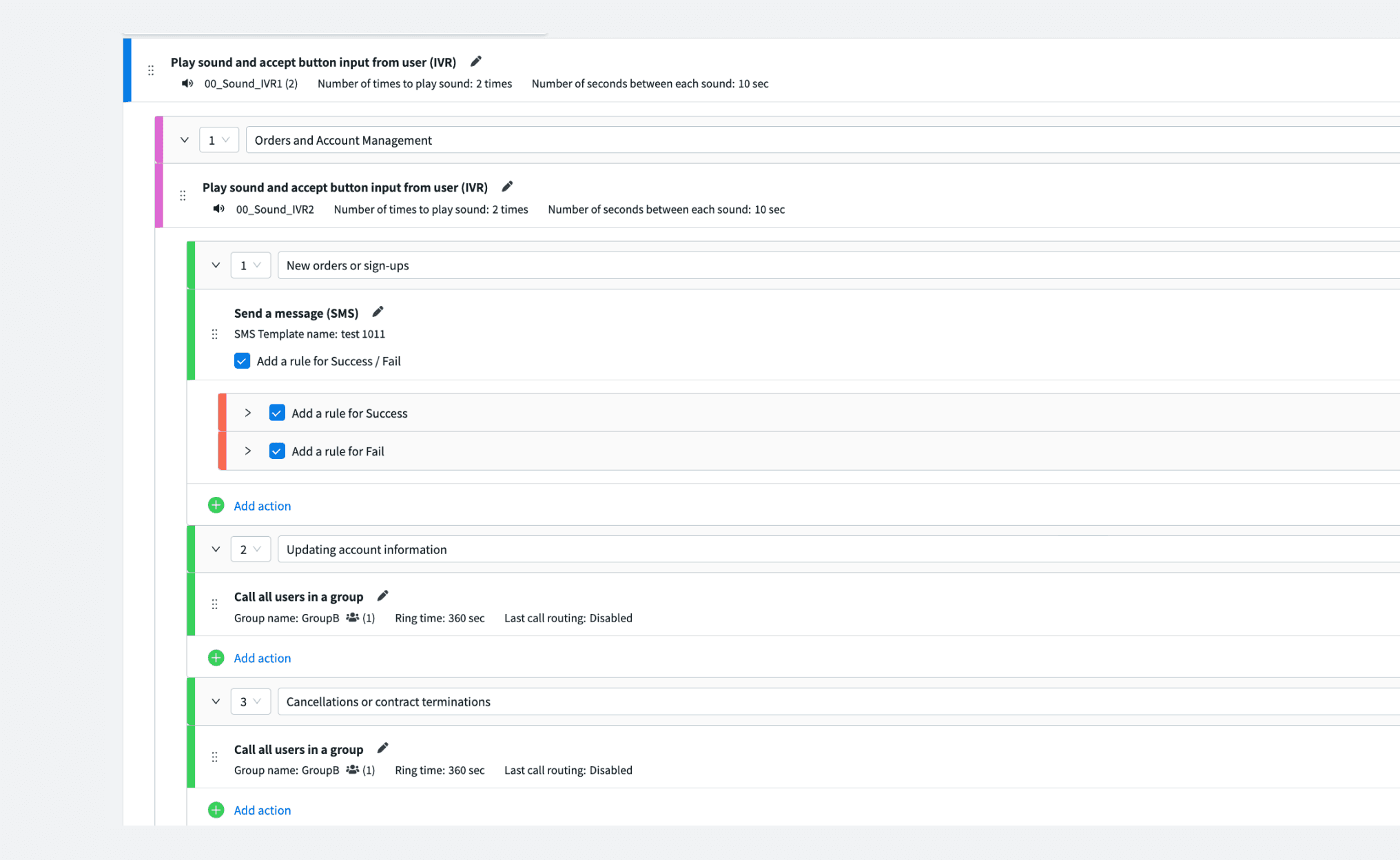
A flowchart-style approach — nodes connected by branching lines — was also considered. But customer success was unanimous: a list-style layout, already used by other companies in the space, was far easier to follow. I adopted a top-to-bottom list, with details collapsible so the full flow stays visible at a glance.
One idea during the redesign was to make the flowchart-style branching explicit, showing both the “Yes” (call answered) and “No” (call continues) paths. But the existing UI had never shown that either, and no one had asked for it — the overview problem was the loud, consistent ask. I prioritized that instead, and used depth color-coding to preserve orientation as IVR branches nested.
Execution
The new experience introduced collapsible steps, drag-to-reorder, in-place sound and group previews, direct creation of related sub-components, and safer deletion behavior. I also redesigned the adjacent queuing settings with a visual setup diagram and more scannable tables.
Partnered with engineering throughout to validate what was technically feasible within the migration window.
26 Mar 2025
V2 opt-in preview launched
23 Apr 2025
V2 became the default experience
25 Jun 2025
V1 access removed; migration complete

Outcome
15.2 / month
V1 only · pre-release baseline
5.5 / month
V2 only · post-migration
A note on the data
This is a keyword-match count across ticket subjects and descriptions, not a manual classification of every inquiry. The change should be read as a reduction in overall feature-area inquiries, rather than a precisely isolated UI effect.